
Every part of your app. One project, one price.
Connect a repository once. Codara builds it, deploys it, routes it, and keeps the app, its database, jobs and domain together in one project.
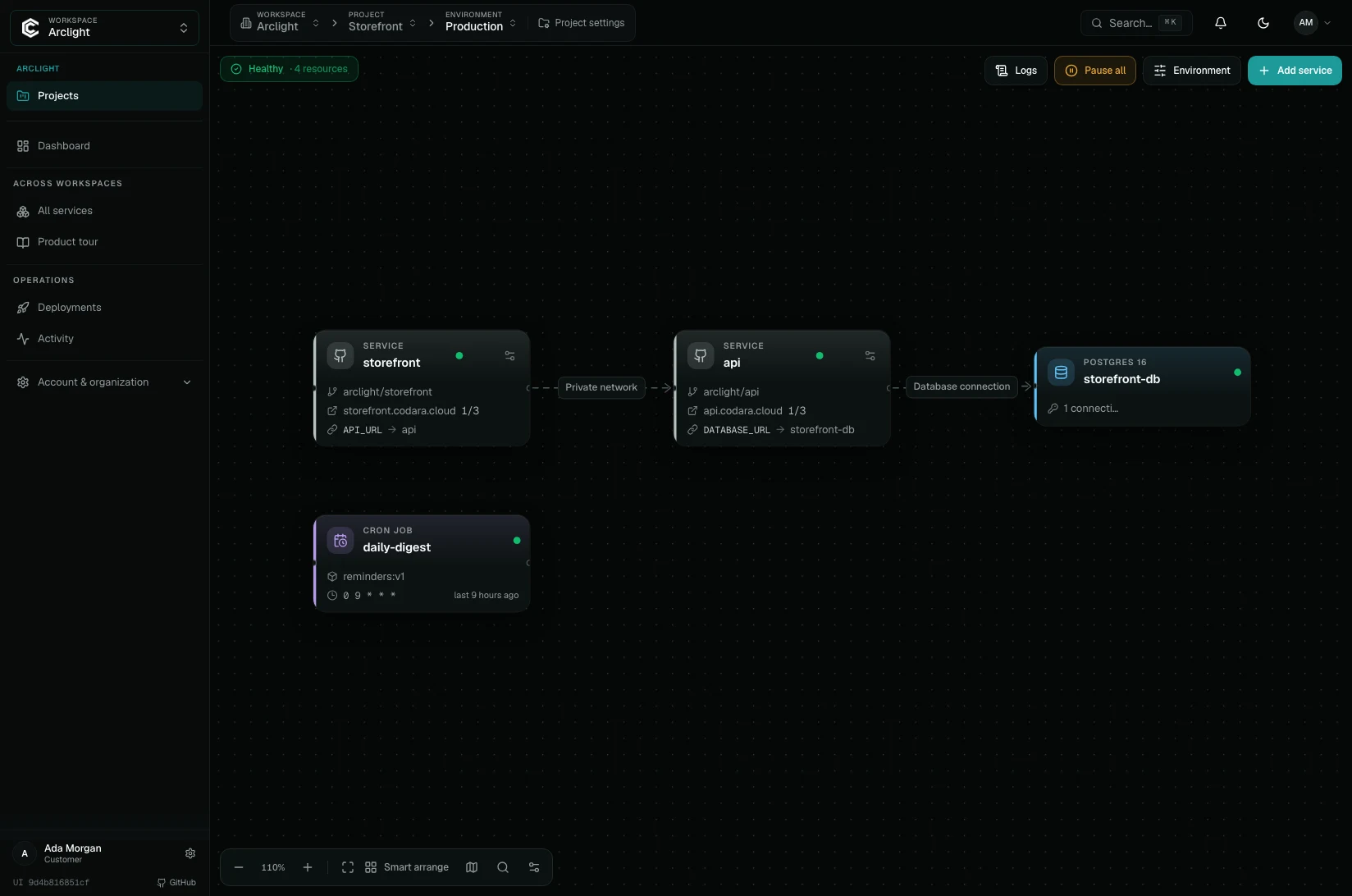
More than web apps.The whole stack deploys together.
A service is any operational part of the product. Add only what the project needs, then configure each environment independently.
Web services and APIs
Built from a GitHub repository or a container image, with health checks, zero-downtime rollout (services with a volume restart instead) and a managed HTTPS hostname.
Databases
PostgreSQL 14 to 16, MySQL 8, MariaDB, Redis and MongoDB. Connection variables are projected into the services that use them.
Jobs and cron
Scheduled and one-off tasks that run beside the application with the same variables and network access.
Disks and buckets
Persistent volumes attached to a service. R2-backed object storage buckets in the European Union are available by separate agreement.
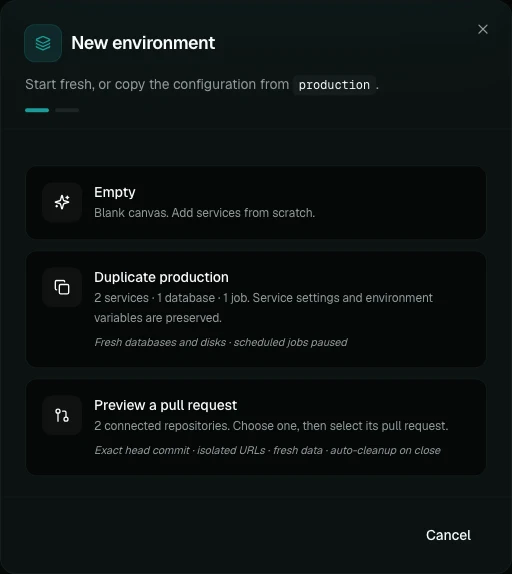
Production stays boring.Previews move fast.
Permanent production, staging, and development environments live beside disposable pull-request previews, all inside one project.
Environment-specific configuration
Change replicas, variables, domains, or data without altering the project.
Safe preview defaults
Previews sleep at zero when idle; databases and domains are never cloned by accident.
Right-sized by default.Adjustable when you care.
Most services run on automatic allocation, so an idle service does not waste the capacity your plan includes. When a workload needs certainty, pick a profile or set CPU and memory yourself.
Automatic sizing
The selected CPU and memory are caps. Codara starts lower and tunes requests from real metrics, every few minutes.
Scaling stops at your plan
Replicas scale on pressure and stop at your plan’s limit. The bill does not move.
Per-service resource profile
Sizes for one service, not plans: every plan can use every profile within its limits. Caps under automatic sizing. Custom from 50m / 64 MiB up to the plan limit.
| Profile | CPU | Memory |
|---|---|---|
| Light | 100m | 128 MiB |
| Starter | 250m | 256 MiB |
| Standard | 500m | 512 MiB |
| Web / API | 500m | 1 GiB |
| Compute | 1 CPU | 1 GiB |
| Memory | 1 CPU | 2 GiB |
Scaling
- Cost saver · Sleeps after 30 minutes idle and wakes on the first HTTP request to its codara.cloud address; custom-domain requests don't wake it. 0 to 3 replicas.
- Always on · One warm instance that scales for traffic. 1 to 3 replicas.
- Fixed · Exactly one instance, no horizontal scaling.
From commit to URL.Without writing pipelines.
Codara builds on its own infrastructure. Your repository workflows can keep doing their own work without becoming a requirement for deployment.
Connect
Choose a repository, branch, root path, and build settings.
Build
Codara builds your app into a container image on its own infrastructure.
Release
Health checks and rollout status decide when the new version is ready.
Route
Managed TLS and DNS verification put the service on its domain.
Or ask your agent.It deploys with the access you give it.
Connect Claude Code, Cursor or Codex through the local MCP server and the codaracloud CLI. Your agent can package the project, start the build, connect the database and hand you the live URL.
Scoped by default
Agent tokens are development-only unless you say otherwise, and destructive actions return a preview until you confirm.
The same project as the console
Projects, environments, services, databases, deployments, domains and logs, whichever way you work.

Watch it run.Logs, metrics and domains for every service.
Open any service to read its live logs, check its CPU, memory and network, and manage its domains, without leaving the project.

Live logs
Search, filter by level, pause and export a service’s runtime output.

Metrics
CPU, memory, and network in and out, each with its peak.

Domains
Every app gets a codara.cloud address with HTTPS. Add your own domain and the panel shows when DNS and TLS are ready.
Who, what, and where.Answered by the structure.
A cloud account owns access and billing. Workspaces separate products or areas of work. Projects hold each product stack. Environments isolate change. Services run the workload. You meet each level only when you need it.
Cloud account
Your organization: people, roles, billing and plan.
Workspace
A product, a client or an area of work.
Project
One application and everything it needs.
Environment
Production, staging, pull-request previews.
Service
App, database, job, disk or bucket.
About Codara Cloud
What the product is, who makes it and where it runs.
What is Codara Cloud?
Codara Cloud is managed app hosting with fixed monthly plans and servers in Helsinki, in the EU, made by Codara Solutions SL in Madrid, Spain. It runs your web services, APIs, databases and jobs together, from €5 to €100 a month before tax, with no automatic usage overage.
Where does Codara Cloud run my app and data?
On Hetzner Cloud in Helsinki, Finland. Apps, databases, volumes, backups and container images are stored in the European Union; Cloudflare’s global network carries app traffic and may cache served content.
Is Codara Cloud the same as Codara (codara.net)?
No. Codara Cloud at codaracloud.com is app hosting from Codara Solutions SL, Madrid. It is not related to codara.net.
Build once. Operate the complete product.
Start with one project and automatic sizing. Add environments, databases and dedicated capacity when the application earns them.